


 Spanish
  French
  German
  Simplified Chinese
 Support
How do I contact MASSO support?
MASSO support can be contacted either via email or via the MASSO support portal
- For easy administration of your support tickets try out the MASSO Support Portal
- How to use your MASSO support ticket Portal https://youtu.be/2NE4DFL4_Ck
- Support Portal Login page https://masso.freshdesk.com/support/login
- MASSO support can also be contacted via email at support@masso.com.au
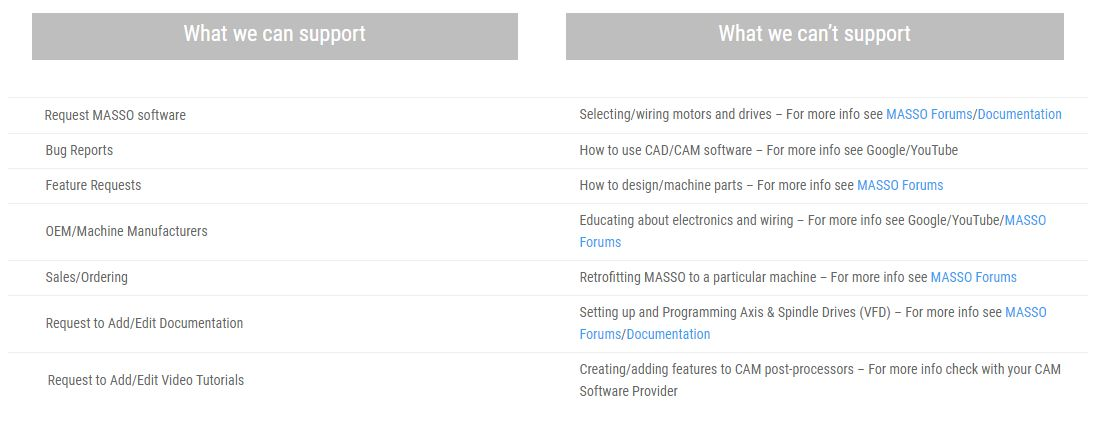
What can MASSO support help with?
Do you offer phone support?
As we have clients in all parts of the world, we are unable to offer phone support. Further by using the MASSO support portal or email allows for a record of questions and the answers to be available to members of the MASSO support team to follow up on and refer back to at a future date. It also eliminates issues of international time zones and assists with language barriers through the use of translation.
- For easy administration of your support tickets try out the support MASSO Portal
- Support Portal Login page https://masso.freshdesk.com/support/login
- How to use your MASSO support ticket Portal https://youtu.be/2NE4DFL4_Ck
- MASSO support can also be contacted via email at support@masso.com.au
What is the MASSO Support Portal?
- The support portal allows you to create and manage support tickets for each question, update, reply, check on progress, close a ticket and review old tickets that have been resolved.
- Support Portal Login page https://masso.freshdesk.com/support/login
- How to use your MASSO support ticket Portal https://youtu.be/2NE4DFL4_Ck
Using the MASSO Support Portal
Reporting a Problem
Printable File
To save your printable file press the  button and the printable settings file will be saved as a txt file to your Flash Drive under the MASSO/Machine Settings folder.

