


 Spanish
  French
  German
  Simplified Chinese
 G03 – Circular Interpolation (Counter Clockwise)
This command runs a circular motion in a counterclockwise direction. The arc starts at the current position and the center is defined by the I, J, K values as an offset of the current position or R for radius. The X, Y & Z values define the finish point. Masso uses Incremental I, J, K values for Arcs
Syntax & Parameters
- G03 starts an arc movement beginning at the X, Y, Z coordinate location where the G03 was issued.
- X Value – This is the X coordinate defining the end point
- Y Value – This is the Y coordinate defining the end point
- Z Value - This is the Z coordinate defining the end point
- I Value – are relative coordinates and define the X center coordinate as an offset of the starting point X coordinate. (Valid in G17 & G18 planes)
- J Value – are relative coordinates and define the Y center coordinate as an offset of the starting point Y coordinate. (Valid in G17 & G19 planes)
- K Value – are relative coordinates and define the Z center coordinate as an offset of the starting point Y coordinate. (Valid in G18 & G19 planes)
- R Value - Is used to define the arc radius for arcs up to 90 degrees.
Caution: The use of R Value for arcs greater than 90 degrees does not work as it defines multiple center points. For arcs greater than 90 degrees use IJK values for G03 commands.
Example program for making an Arc
N10 G00 X20 Y10 Z-1
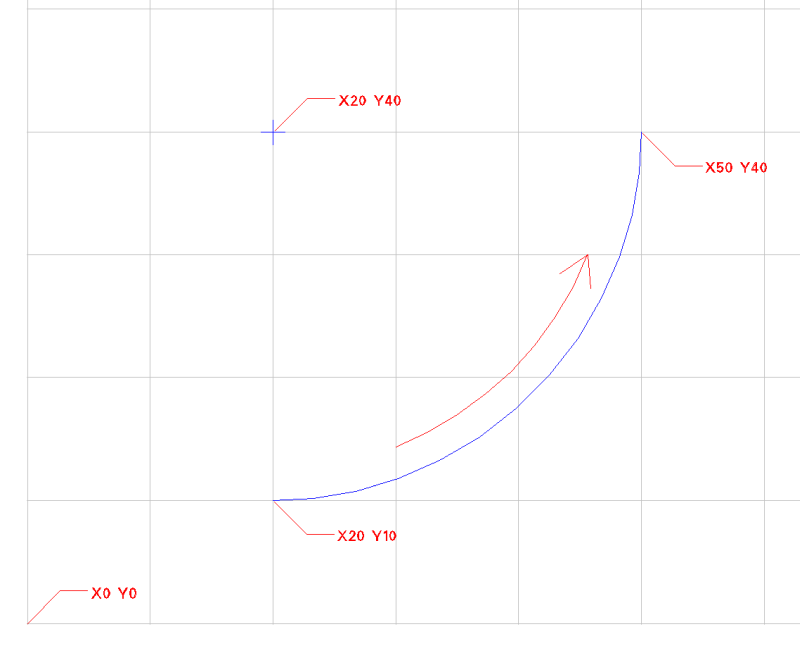
N20 G03 X50 Y40 I0 J30
- In the above example in the first line moves to position X20 Y10 Z-1
- An arc is made starting at position X20 Y10 and ending at coordinate X50 Y40 with the center at position X20 Y40 moving in a counterclockwise direction. The Z height does not change.
- The Arc center is calculated as follows
- Starting position X20 + I0 = Center X coordinate X20
- Starting position Y10 + J30 = Center Y coordinate Y40
Example program for making a Spiral
N10 G00 X20 Y10 Z0
N20 G03 X50 Y40 Z-3 I0 J30
- By adding a Z height into G03 you can create a spiral arc
- In the above example in the first line moves to position X20 Y10 Z0
- An arc is made starting at position X20 Y10 and ending at coordinate X50 Y40 with the center at position X20 Y40 moving in a counterclockwise direction. The arc is the same as in the diagram above but the Z axis will descend from its current height to -3 units at a uniform rate over the arc to form a spiral path.
- The Arc center is calculated as follows
- Starting position X20 + I0 = Center X coordinate X20
- Starting position Y10 + J30 = Center Y coordinate Y40
INFORMATION: Units are defined as either inches or mm depending on your machine's setup or G20 or G21 command in use.

