MASSO Documentation
Warnings and Cautions
MASSO AI
myWorkshop
Adding a DTHC
OEM and Distributors
Linking DTHC
myWorkshop PRO
MASSO - FAQ's
About MASSO
MASSO Touch - FAQ's
Purchasing MASSO
Machine conversion and Builds
Motors and Drives
Plasma
Lathe
Encoders
Spindles
Tool Changers
5 Axis Machining
Drill Heads, saws and EDM
Support
Finding your MASSO Serial number
Getting Started Guides
Installing MASSO
Powering MASSO Touch
Powering MASSO-G3
Powering MASSO-G2
Password Reset
Connecting a Screen
Connecting Keyboard & Mouse
Loading software onto MASSO Touch
Loading Software to MASSO-G3
Loading Software to MASSO-G2
MASSO Settings
General settings
Homing Settings
Lubrication Settings
Tool Changer Settings
Axis Settings
Touch probe settings
Auto Tool Zero Settings
Multi-Head Settings
QR Scanner Settings
User Account Settings
Load and Save Calibration Settings
Admin and User Passwords
Wiring and Calibration
QR Scanner
Current Software Versions
Machining with MASSO
Loading Software to MASSO-G3
Loading Software to MASSO-G2
Admin and User Passwords
Graphical Interface
Graphical Interface MASSO G3
Graphical Interface MASSO G2
Controller Alarms
Touch Screen Interface
Keyboard and Key Shortcuts
Setting Time & Date
Homing the machine
Jogging
Jogback
Feed rate override
Spindle RPM Override
MDI command
Creating New G-Code Files
Editing G-Code
Resetting Job Counter
Loading & Running G-Code
Resuming Program or Jump to Line
Single Block
Wi-Fi Connectivity
MASSO Link Software
macOS Instructions
Windows Instructions
Making QR Codes
Calibrating Tools
Lathe Tool Calibration Steps
Mill Tool Calibration Steps
Work Offsets
Cutter Compensation - Z Wear
Conversational Programming
Lathe Conversational Wizards
Mill Conversational Wizards
Using Conversational Wizards
Auto Loading G-code
Probing
Top of Part Probing Cycle
Side of Part Probe Cycles
Corner Probing Cycles
Center Probing cycles
Quick Start Guides
Best practice when wiring MASSO
Setup MASSO Mill
Setup MASSO Plasma
Setup MASSO Lathe
Setup Rotary Axis
Setup Laser Engraving
Installing an Opt Lasers
Setting up Lightburn
Setup MASSO QR Scanner
Homing Sensor Identify & Connecting
Homing
Troubleshooting Guides
Ground Loops
Symptoms of Ground Loop Damage
Checking Optocouplers
VFD and Spindle Testing
Axis Testing
G-Codes and Post processors
Supported G-codes
G00 - Rapid Motion
G01 - Linear Interpolation Motion
G02 – Circular Interpolation (Clockwise)
G03 – Circular Interpolation (Counter Clockwise)
G04 – Dwell
G10 – Set Work Offset Values
G17 – XY Plane Selection
G18 – ZX Plane Selection
G19 – YZ Plane Selection
G20 – Set Machine Units To Inches
G21 – Set Machine Units To Millimetres
G28 – Return To Machine Home
G30 - Move to Parking Position
G32 – Threading Cycle
G38.2 – Straight Probe Cycle
G38.6 - Digitizing Probing Cycle
Auto Levelling using G38.6
G38.7 - Center Probing Cycle
G40 - Cutter Compensation Off
G41- Cutter Compensation Left
G42- Cutter Compensation Right
G53 – Move In Absolute Machine Coordinates
G54 to G59 – Select Work Offset Coordinate System
G54.1 - Extended Work Offsets
G73 – High Speed Peck Drilling
G80 – Cancel Modal Motion
G81 – Drilling Cycle
G82 – Drilling Canned Cycle With Dwell
G83 – Peck Drilling For Deeper Holes
G90 – Set Distance Mode To Absolute
G91 – Set Distance Mode To Incremental
G92 – Temporary Work Offset
G92.1 – Cancel Temporary Work Offset
G93 – Inverse Time Mode
G94 – Units Per Minute Mode
G95 - Feed Per Revolution
G96 – Turn on Constant Surface Speed (CSS)
G97 – Turn off Constant Surface Speed (CSS)
G98 – Canned Cycle – Retract Back To The Initial Z
G99 – Canned Cycle – Retract Back To R Plane
G200 - Plasma Parameters
G200 - Laser Parameters
T - Tool Number
MSG - Message command for screen and remote alerts
F - Feed rate
N - Number
S - Speed / Intensity
( ) - Comments
Invalid Gcode
Supported M-codes
M00 – Program Stop
M01 – Optional Program Stop
M02 – Program End
M03 – Spindle ON (Clockwise)
M03 – Plasma Torch ON
M03 – Laser output enable with motion
M04 – Spindle ON (Counter Clockwise)
M04 - Laser On Immediate
M05 – Spindle OFF
M05 – Plasma Torch OFF
M05 - Laser off Immmediate
M06 – Tool Change
M06.1 - Tool Unload
M07 – Turn Mist Coolant On
M08 – Turn Flood Coolant On
M08 - Laser-Air Assist On
M09 – Coolant Off
M09 – Laser-Air Assist Off
M10 – Chuck Or Rotary Table Clamp closed
M11 – Chuck Or Rotary Table Clamp Open
M30 – End The Program And Rewind
M62 – Turn On Digital Output Synchronized With Motion
M63 – Turn Off Digital Output Synchronized With Motion
M64 – Turn On Digital Output Immediately
M65 – Turn Off Digital Output Immediately
M66 - Wait for Input
M666 – Plasma – Turn THC Function Off
M667 – Plasma – Turn THC Function On
M85 - Open Door
M86 - Close Door
M98 & M99 – Sub Program Call
CAM Post Processors
Artcam
BobCAD-CAM
Fusion 360
SheetCAM
Vectric VCarve and Vectric Aspire
Version 5 Plasma POST Processor Requirements
Other CAM Software
Wiring and Setup
Multi-Head
Introduction
Main Spindle
Multi Spindle 1 - 4
Dry Run Laser Pointer
Laser Engraving/Cutting
Plasma Torch and MASSO DTHC
OXY Torch
WaterJet
Scribe Tool
Pen 1 & 2
Camera
Setup and Calibration
Mounting and Mechanical Data
MASSO G3 Touch Wiring Module
EStop Wiring
Axis Servo/Stepper examples
Differential Receiver Module
MASSO Closed Loop Stepper Motors
MASSO Closed Loop stepper Troubleshooting
Gecko 203V
Gecko G340
Gecko G540
Teknic - ClearPath
Leadshine MX4660
Leadshine CS-D1008
Longs Motors
CNCdrive - DG4S-16035
DMM - Dynamic Motor Motion
VEXTA
Viper
Mitsubishi - MR-J3
PoStep60
Panasonic
Automation Technology Inc.
Hiwin
Yaskawa
Spindle Control
Spindle VFD examples
Bosch Rexroth VFD
Delta C200 VFD
Delta MS300 VFD
Delta VFD-M
Hitachi VFD
Lenze VFD
Mitsubishi FR-D720S-100
Schneider Altivar 18
TECO Westinghouse VFD
Yuhuan Huanyang
Door Input
Setting default units to mm or inches
Axis Calibration
Axis Calibration Wizard
Backlash Compensation
Slave Axis
Homing / Home Inputs
Soft & Hard Limits
List of Configurable Inputs
List of Configurable Outputs
TTL Outputs
Controlling Relays
MPG Pendant
Tower Lights
Installing or Replacing Backup Battery
User Account Settings
MASSO Homing Sensor
MASSO Optical Encoder
MASSO Relay Module
MASSO G2 Drive and Relay wiring
Lubrication
MASSO G2 Replacing Damaged Optocouplers
MASSO G3 Replacing Damaged Optocouplers
Spindle RPM Encoder
Upgrading the Spindle encoder on MASSO G2
Save & Load Settings
3D Touch Probe
Measure Touch probe length
Probing Touch Plate
Tool Setter
How Tool Setter Works
Automatic Tool Length Calibration
Tool Changers
Tool Numbering in MASSO
Mill Tool Changers
Manual Tool Changer
Linear Tool Changer (Type 1)
Linear Tool Changer (Type 2)
Linear Tool changer -Beta version
Popup Tool Changer - Beta
Linear Tool Changer configuration
Umbrella Tool Changer
High Speed Rotary Tool Changer
Dust Hood - Beta Version
Lathe Tool Changers
Manual Tool Change
Linear - Gang Type Setup
4 Station Turret
EMCO PC55 Turn
4 Bit Digital Signal Output Turret
Hercus PC200 - Tool Turret
Pragati BTP-63, BTP-80, BTP-100, BTP-125
EMCOturn 120
WABECO Tool Turret
Automatic Doors
Adding New Tool Changers
Plasma - Torch Height Control
Installing MASSO Plasma and DTHC
Proma Compact THC 150
Hypertherm 45, 65 & 85
Torch Touch (floating head) Signal
Torch Breakaway Signal
How MASSO G3 Plasma works
Original Equipment Manufacturer(OEM)
OEM Logo & Details
Sherline Mills and Lathes
Wiring & Setup
3DTEK Routers
CANCAM Routers
REVO CNC
Getting Support
Forums & Email Support
Reporting Bugs & Issues
Purchasing
Payment
Shipping & Delivery
Warranty
Returns
MASSO Documentation
Spanish
French
German
Simplified Chinese
Select Language
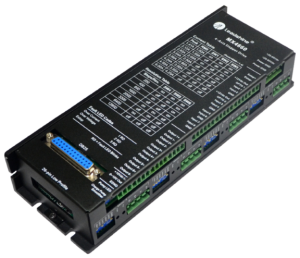
Leadshine MX4660
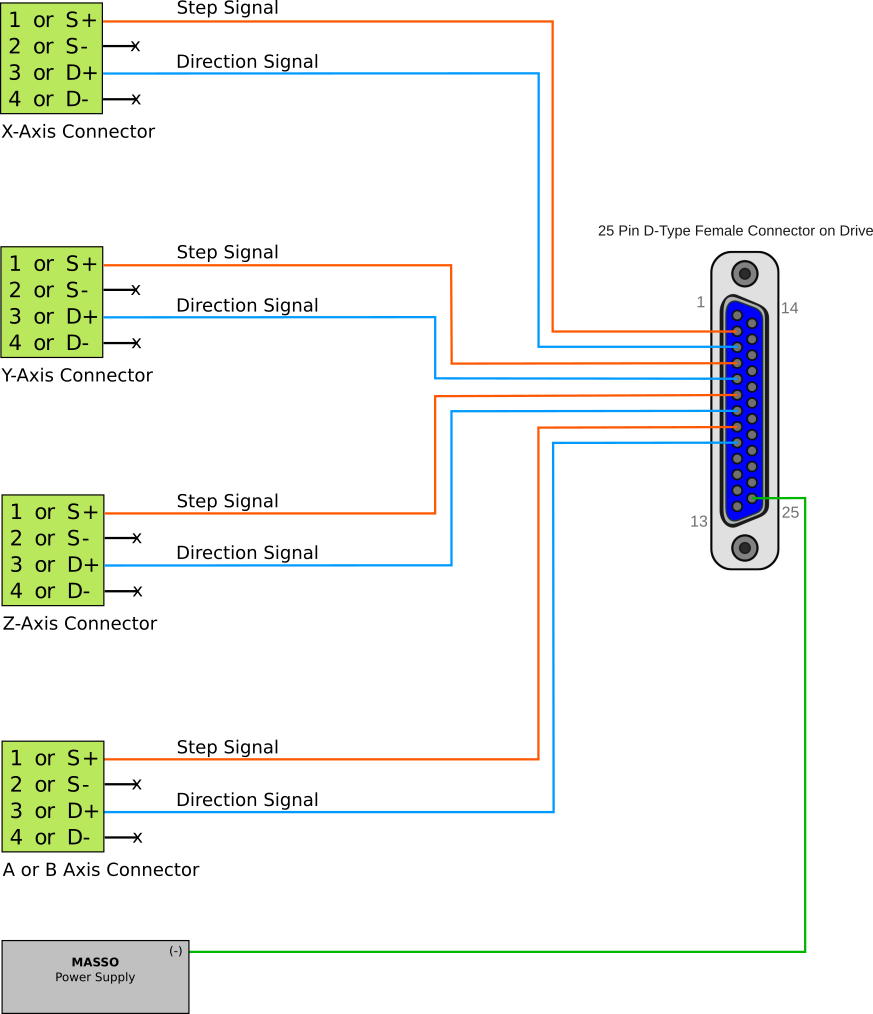
Leadshine Drive MX4660 wiring example
CAUTION:
The
“x”
sign means do not connect.
Back
Teknic - ClearPath
Leadshine CS-D1008
Next
CONTENTS
Leadshine Drive MX4660 wiring example


 Spanish
  French
  German
  Simplified Chinese