


 Spanish
  French
  German
  Simplified Chinese
 Installing or Replacing Backup Battery
An internal backup battery is required for the controller to work properly.
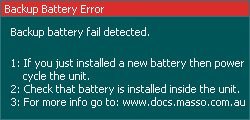
If the controller's battery is not installed or the battery fails and needs to be reinstalled then the below message will be displayed when the controller is powered up.
After installing a new battery, power on the unit and you will still see the same error message, next power off the controller and power back on after 5-10 seconds and the message will be automatically removed once the battery is detected by the controller.
INFORMATION: A backup battery (model CR2032) is required for the controller to function and MUST be installed in the unit before use.
WARNING: After changing the battery make sure the controller is showing the correct loaded tool number as the loaded tool number will be reset to 0 after replacing the battery.

