


 Spanish
  French
  German
  Simplified Chinese
 Automatic Doors
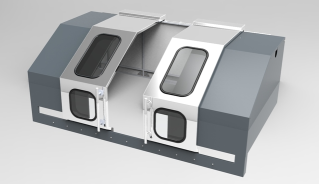
During a manual tool change sequence the door will automatically open to allow the user to change the tool.
The doors do not open during an automatic tool change.
A sounder is output is provided to alert the user that the door is about to open or close.
The doors can also be opened and closed using an external button or by using Gcode.
A door sensor input to monitor the status of the door which will put the machine into Feed Hold if the doors are opened while machining is in progress.
Inputs and Outputs
Outputs
- Door Open / Close output on MASSO and sets the output HIGH to open the door.

- Sounder output provides a warning of the door opening.

- The output will change to HIGH for 1 second before the door starts to move then pulses between HIGH and LOW every 0.5 seconds for the next 5 seconds as the door opens.
- Depending on the sounder you are using you can either drive it through a TTL MASSO relay or if the sounder is TTL compatible it can be directly driven.
- MASSO TTL Outputs provide logic level signals only 5volts @ 5ma
Inputs
- An external button to open and close of the door can be provided by configuring the Door Open Close input.

- This allows the door to be opened manually as needed and acts as a toggle. A Momentary press of the button it will either open or close the door depending on it's current state.
- This input is active when it changes to HIGH
- This Input monitors if the door is open or closed.

- When this input goes HIGH MASSO will put the machine into Feed Hold.
- If you tick Enable Cycle Start in door close in the F1 screen under General settings the machine will automatically restart when the door closes.

- It you do not enable this then the machine can be restarted by pressing Cycle Start.
- For more information on the Door input please see https://docs.masso.com.au/wiring-and-setup/setup-and-calibration/door-input
Manual Tool change Door Logic
- During a manual tool change the spindle will move to the tool change position.
- Sounder output provides a 1 second continuous tone to warn the door is about to open.
- The Door Open / Close output changes to HIGH to open the door.
- Sounder output provides a beeping to warn the door is opening.
- The user manually changes the tool.
- The user presses Cycle Start.
- Sounder output provides a 1 second continuous tone to warn the door is about to close.
- The Door Open / Close output changes to LOW to close the door.
- Sounder output provides a beeping to warn the door is closing.
- When the door is closed the Tool setter Air Blast cleans the tool setter.
- The spindle moves to the Tool setter touch off to measure the tool if required.
- The Spindle returns to the position it was before the tool change was called and machining continues.

