


 Spanish
  French
  German
  Simplified Chinese
 Multi-Head Settings
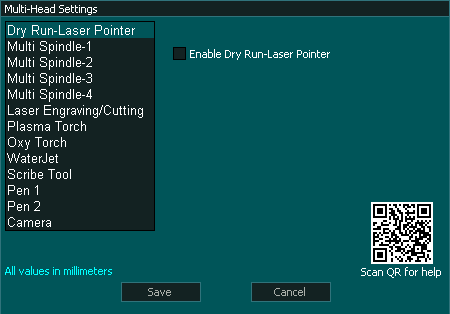
Multi-Head
MASSO G3 & MASSO Touch allow the user to have multiple heads attached to their machine and each head has it's own parameters to define some functions and offsets from other heads.
Each tool is assigned a tool number and changing between head is as simple as changing tool.
With the exception of the main spindle all tools 0 & 101 to 118 are disabled and need to be enable before they can be used
- Dry Run Laser Pointer
 Tool Number 0
 - Main spindle Tool Numbers 1-100
- Laser engraver / cutter Tool Number 111
- Multi spindles 1 - 4 Tool Numbers101 - 104
- Plasma Torch Tool Number 112
- Oxy Torch Tool Number 113
- Water Jet Tool Number 114
- Scribe Tool Tool Number 115
- Pen 1 & 2 Tools Number 116 & 117
- Camera Tool Number 118
For information on the various Multi-Heads please see; >> Multi-Head

