G54.1 - Extended Work Offsets

Overview

The G54.1 command provides access to extended work offsets, adding one hundred additional coordinate systems beyond the standard G54 to G59 offsets.


When combined, MASSO supports a total of 106 work offsets, consisting of G54 to G59 and G54.1 P1 to G54.1 P100.


Accessing Extended Work Offsets

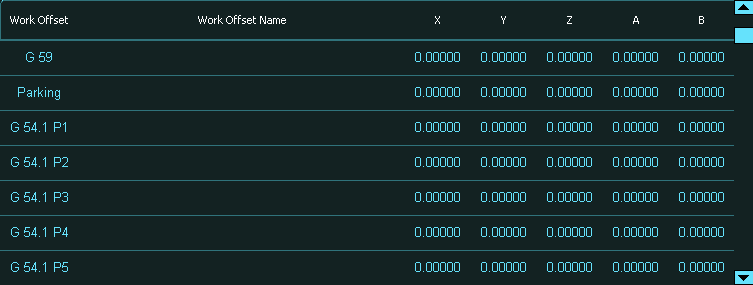
Extended work offsets are displayed in the Work Offset screen.


The list of offsets can be scrolled using the slider bar on the right-hand side of the work offset list.


Each extended work offset is identified using the format G54.1 P1 through G54.1 P100. For example, G54.1 P1 refers to the first extended work offset, while G54.1 P100 refers to the one hundredth extended work offset.


These offsets are modal, which means that once a G54.1 P# command is issued, the selected offset remains active until another work offset command is executed.


Programming Extended Work Offsets

Extended work offsets can be programmed or modified using G-code commands or by editing them directly on the touchscreen.


Extended work offsets can be set using the G10 L20 or G10 L20.1 commands. For example, the command G10 L20 P50 X100 Y200 Z0 sets the coordinates for G54.1 P50.


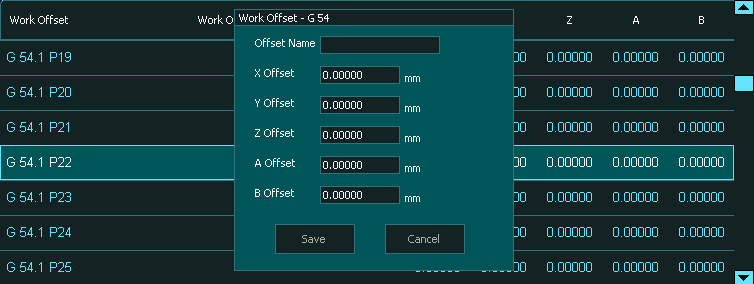
Extended work offsets can also be edited manually by double-tapping on an offset entry in the Work Offset list on the touchscreen and entering the required values.


Syntax

 
G54.1 P<value>


The P value specifies which extended work offset to activate, with valid values ranging from 1 to 100.


Example Program


N10 G54.1 P50


In this example, the G54.1 P50 work offset is selected and remains active until another work offset command is issued, such as G55, G59, or another G54.1 P# command.


Notes

The G54.1 P1 to G54.1 P100 commands belong to Modal Group 12.


Extended work offsets function identically to the standard G54 to G59 work offsets but provide significantly more flexibility when managing multiple setups.


These offsets are ideal for use with multi-part fixtures, rotary tables, or production workflows that require multiple coordinate systems within a single program.