


 Spanish
  French
  German
  Simplified Chinese
 M11 – Chuck Or Rotary Table Clamp Open
This command sets the Chuck Clamp output to High.
This is considered in MASSO logic as the Chuck Clamp being open
CAUTION: For safety this output HIGH means the clamp is open and an interlock signal from the spindle drive must be wired for safety so that the clamp does not open while the chuck is spinning.
Syntax & Parameters
- M11
Example program
N10 M11
In this example the Chuck Clamp is opened.
If you try and start the spindle while the Chuck Clamp is open you will see the following Message.
Pressing OK will remove the message.
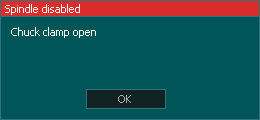
To continue you need to close the Chuck Clamp and manually start the Spindle before pressing Cycle Start if you are running Gcode program.
CAUTION: If you run your program with the Chuck clamp open the spindle will not start and the program will continue with the spindle off. This may cause damage to your machine or work.
- The Chuck clamp can also be opened and closed from the MDI screen using the
 and the
  buttons.
 - An external Chuck Clamp/Unclamp input can be assigned to toggle the chuck clamp open and closed as needed.
- These buttons are interlocked to the spindle status and will not allow the spindle to open when the spindle is on or allow the spindle to start when the chuck clamp is open.
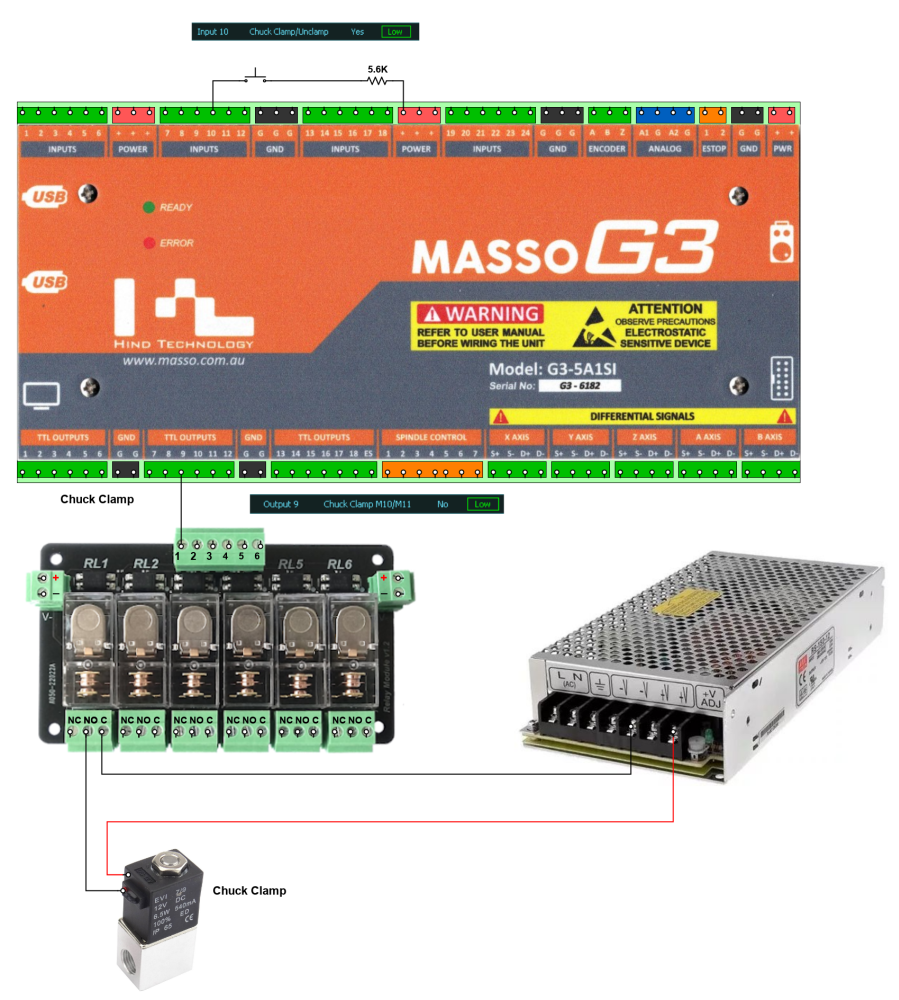
Example Chuck Clamp wiring

